Every online transaction depends on infrastructure most customers never think about — until it fails at checkout. The payment gateway features you choose determine whether a sale gets approved, whether card data stays secure, and whether your transaction data actually helps you grow. Yet many merchants pick a provider based on price alone, then discover the gaps — weak approval rates, thin security, unusable reporting — only after they’ve gone live.
What payment gateway features should I look for first?
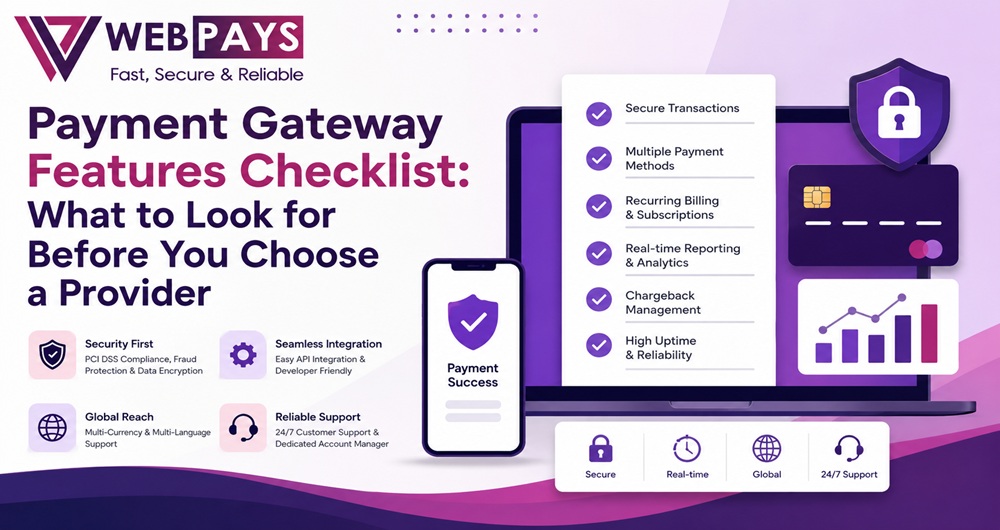
Before comparing pricing plans or reading reviews, narrow your search to a handful of non-negotiable payment gateway features. These form the foundation everything else builds on:
- Security and compliance certifications — PCI DSS compliance and tokenization should be standard, not an upsell.
- Reliability and uptime — a gateway that goes down mid-sale costs real revenue, so ask for uptime commitments rather than marketing claims.
- Broad payment method support — cards, digital wallets, and bank transfers, so you’re not turning away customers who prefer a method you don’t accept.
- Straightforward integration — plugins for your existing platform, or a documented API, that your team can implement without months of development.
- Transparent pricing — clear settlement timelines and fee structures, with nothing buried in the contract.
Get these five right first, and the rest of your evaluation — success rates, analytics, checkout style — becomes fine-tuning rather than damage control later. Treat this as a filter: any provider that can’t give a straight answer on all five is worth dropping before you go further.
How do I choose the right payment gateway features for my business?
There’s no single “best” set of payment gateway features — the right combination depends on how your business actually operates. Start by answering a few questions about your own model:
- What do you sell, and how often do customers pay? A subscription business needs strong recurring billing, dunning, and automatic card-update tools. A one-time-purchase model can prioritise a fast, simple checkout instead.
- Where are your customers? If you sell internationally, multi-currency pricing and support for regional payment preferences matter more than they would for a purely domestic store.
- What’s your risk profile? Standard retail, digital goods, travel, and more specialised or high-risk categories like gaming, forex, or adult content are underwritten differently — and a provider that only serves “safe” categories may reject or drop you later as your business evolves.
- How fast are you growing? A gateway that works fine at 100 orders a month may not hold up at 10,000. Check whether pricing and infrastructure scale with you, or whether you’ll be forced to migrate later.
Map these answers against your shortlist before signing anything. The goal isn’t the provider with the longest feature list — it’s the one whose features line up with what your business needs today, and what it’s likely to need over the next year or two.
Which payment gateway features can improve my transaction success rate?
A declined payment doesn’t always mean a customer can’t pay — often it means the transaction was routed or authenticated poorly. Several payment gateway features directly influence how many attempted payments actually go through:
- Smart routing — sending each transaction through the acquiring bank or network most likely to approve it, instead of a single fixed path.
- Network tokenization — replacing card numbers with tokens issued directly by the card networks (Visa, Mastercard). Card networks have reported measurably higher approval rates on tokenized transactions compared with raw card numbers, along with fewer false declines.
- Automatic card-updater services — so an expired or reissued card updates in the background instead of silently breaking a recurring payment.
- Risk-based authentication — applying extra verification, like 3D Secure, only when the risk profile calls for it, rather than adding friction to every single transaction.
- Smart retry logic — recognising the difference between a “try again later” decline (insufficient funds) and a “don’t retry” decline (stolen card), and acting accordingly.
- Decline-code visibility — reporting that tells you why a payment failed, not just that it failed, so the underlying pattern can actually be fixed.
Together, these features close the gap between attempted and completed revenue — often the single largest lever a merchant has over their bottom line, ahead of any pricing negotiation.
What payment gateway security features should I look for?
Payment security isn’t just a compliance checkbox — it’s what keeps customer trust intact and keeps your business out of the headlines for the wrong reasons. Look for these payment gateway security features specifically:
- PCI DSS compliance, confirming the provider meets the current industry standard for handling card data.
- End-to-end encryption and tokenization, so sensitive card data never touches your own servers in a readable form.
- 3D Secure / Strong Customer Authentication support, adding an extra identity check for higher-risk transactions.
- Layered fraud screening — address verification (AVS), CVV checks, device fingerprinting, geolocation, and velocity rules that flag unusual patterns in real time.
- Chargeback and dispute management tools, ideally with proactive alerts before a dispute escalates into a formal chargeback.
- Clear regulatory and data-handling practices, especially if you operate across borders or in a regulated sector.
A gateway that bundles these as standard — rather than charging extra for “premium security” — is signalling that security is core to how it operates, not an add-on bolted on afterward.
Why do I need payment gateway analytics and reporting?
You can’t fix what you can’t see. Payment gateway analytics turn raw transaction logs into decisions you can actually act on:
- Approval and decline trends show whether a revenue dip is a demand problem or a payments problem — two issues with completely different fixes.
- Payment method performance reveals which cards, wallets, or bank transfers convert best with your specific customers, so you know where to focus.
- Reconciliation reporting saves hours of manual matching between what the gateway settled and what your accounting system shows.
- Fraud and dispute patterns help you catch emerging risks before they scale into real losses.
- Checkout funnel data shows exactly where customers abandon payment, so you can fix the step that’s actually costing you sales.
Without this visibility, most merchants only notice a payments problem once it shows up as a revenue drop — weeks after it started. Strong reporting turns that lag into a same-day fix, and gives you the data to negotiate routing or pricing from a position of knowledge instead of guesswork.
Should I choose payment gateway API integration or ready-to-use checkout?
This decision comes down to trading control for speed — and there’s a reasonable case for either path.
API integration gives you full control over the checkout experience. Payment fields sit directly on your own page, styled to match your brand, with no redirect to interrupt the customer’s flow. The tradeoff: your systems handle more of the sensitive payment data directly, which increases your PCI DSS scope, and you’ll need development time to build, test, and maintain it.
Ready-to-use checkout (hosted or embedded) shifts most of that complexity to the provider. Customers are either redirected to a secure payment page or complete payment inside an embedded, tokenized field — either way, sensitive card data is handled by the gateway, not your servers. This cuts your compliance burden dramatically and gets you live in days rather than months, at the cost of some flexibility over exactly how checkout looks and feels.
How to decide:
- Choose API integration if a conversion-critical, fully on-brand checkout matters more than speed to launch, and you have development resources to maintain it.
- Choose ready-to-use checkout if you want to launch quickly, minimise compliance overhead, or don’t have a dedicated dev team.
- Better yet, look for a provider offering both — so you can launch with the ready-to-use option now and move to a custom API integration later without switching providers entirely.
What payment gateway features should I check before choosing a provider?
Once you’ve narrowed your shortlist, run every provider through the same final checklist before signing anything:
- Security certifications — PCI DSS compliance, tokenization, and 3D Secure confirmed in writing, not just implied.
- Payment method and currency coverage — matched against where your actual customers are, not a generic list.
- Integration options — plugins for your platform, a documented API, or both, with realistic setup timelines.
- Success-rate tools — smart routing, retries, and network tokenization, not just a claim of “good uptime.”
- Reporting depth — real access to transaction-level and reconciliation data, not a summary dashboard only.
- Support quality — a real point of contact for payment issues, ideally available outside standard business hours.
- Pricing transparency — settlement timelines, per-transaction fees, and hidden costs (chargebacks, currency conversion, monthly minimums) spelled out clearly.
- Scalability and industry fit — confirmation the provider can support your volume and business category as you grow, including specialised or high-risk categories if that applies to you.
- Track record — independent reviews and existing merchant references, not just testimonials on the provider’s own site.
If a provider hesitates to give you a straight answer on any of these, treat that as useful information in itself.
How Webpay Delivers on the Features That Matter Most
Every feature covered above is built into how Webpay operates, rather than sold back to you as a paid extra:
- Security by default — Webpay’s platform is PCI DSS certified, with 3D Secure transaction support and layered fraud prevention built into every account, including AVS, CVV verification, device ID checks, geolocation, and fraud scoring.
- Chargeback protection — a chargeback guarantee model designed to resolve disputes before they escalate into a formal chargeback, reducing both the financial and administrative load on your business.
- Flexible integration, either way — a no-code plugin for platforms like WooCommerce, Magento, PrestaShop, OpenCart, or WHMCS, or a direct API for full control over checkout. Webpay supports both, so the API-vs-ready-to-use decision above doesn’t lock you into one path permanently.
- Global reach — multi-currency payment acceptance and multi-language checkout, so you can sell to customers worldwide without asking them to think in a foreign currency.
- Real visibility — a dashboard built for reconciliation and reporting, so you’re not exporting spreadsheets just to understand your own transaction data.
- Human support — a dedicated account manager, available 24/7, who understands payment flows well enough to help improve conversion, not just log a ticket.
- Room to grow into specialised categories — alongside standard e-commerce, Webpay works with gaming and forex businesses that many mainstream providers turn away, so your options stay open as your business evolves.
Every checklist in this guide works both ways — use it to evaluate any provider, including this one. Get in touch with Webpay to talk through what your business actually needs.
FAQs
What’s the difference between a payment gateway and a payment processor?
A payment gateway captures and encrypts transaction data at checkout; a payment processor moves that data through the banking network to authorise and settle the payment. Many providers, including Webpay, offer both under one integration, so you don’t need to manage separate relationships.
How much do payment gateway fees typically cost?
Fees vary by provider, transaction volume, and risk category, but most combine a per-transaction percentage with a small fixed fee. Ask any provider for a full breakdown, including settlement time, currency conversion charges, and chargeback fees, before comparing headline rates.
How long does it take to integrate a payment gateway?
A ready-to-use checkout or plugin can often go live within days. A custom API integration usually takes longer, depending on your development resources and how much of the checkout experience you’re customising.
Can I switch payment gateways without disrupting my business?
Yes, with planning. Migrating stored payment tokens, updating recurring billing schedules, and testing the new integration alongside the old one before cutting over all reduce the risk of dropped transactions during a switch.
Do I need a separate merchant account, or does the gateway include one?
It depends on the provider. Some payment gateways bundle merchant account services; others require you to hold one separately. Confirm this upfront, since it affects both setup time and where your funds settle.
Is Webpay suitable for high-risk or specialised businesses?
Yes. Alongside standard e-commerce, Webpay supports higher-risk and specialised industries that many mainstream gateways decline, backed by the same security, fraud prevention, and chargeback protection available to every merchant. See the full FAQ page for more account-specific questions.
Choosing a payment gateway gets easier once you know which features actually move the needle: security and compliance first, success-rate tools close behind, and analytics to keep improving both over time. Match those priorities against your own business model rather than the longest feature list you can find, and you’ll end up with a provider that supports growth instead of getting in its way.
If you’d like to see how these features work in practice, get in touch with Webpay to talk through what your business needs.